
FlightAware Flight Tracker
FlightAwareTravel & Local
3.83.77K Reviews
- Version
- 5.16.3
- Installs
- 10.00M
- Age Rating
- Everyone
Screenshots
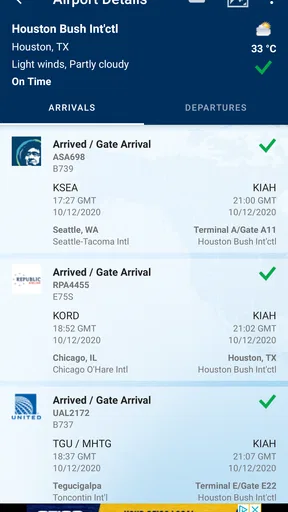
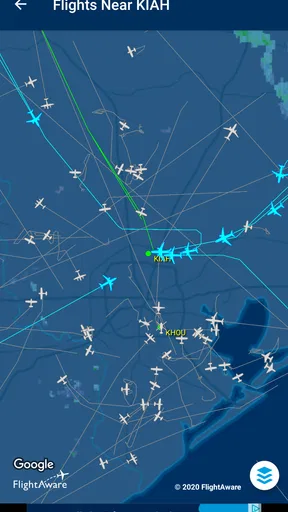
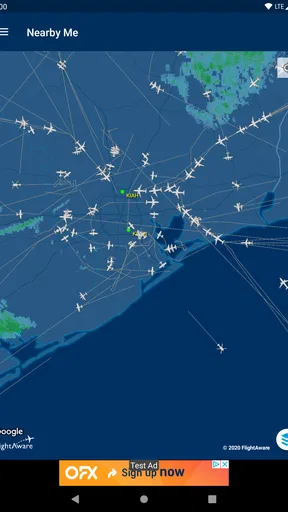
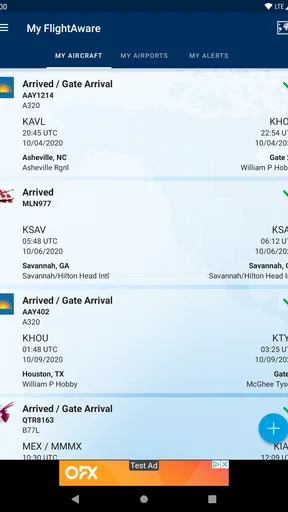
Our Review of FlightAware Flight Tracker
 Analysis by Appyee
When a flight is part of my day, I want more than a departure time: I want to know whether the plan is still holding and what to do if it changes. FlightAware Flight Tracker is most useful when I start with a flight number, airport, or route and follow the journey as it unfolds. It is a free travel app from FlightAware, rated for Everyone, and its focus is clear: turn flight information into something I can check quickly, whether I am travelling or waiting for someone else.
Before leaving: check the flight, not just the schedule
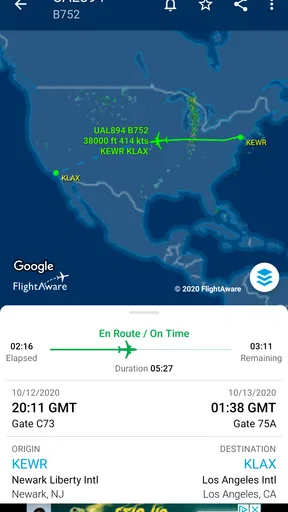
My practical starting point is to search for the flight before setting out for the airport. A scheduled arrival time is only one piece of the picture; the current status and map can help me judge whether the trip is progressing as expected. If I am collecting someone, that can prevent an unnecessary early wait at the arrivals area. If I am the passenger, it gives me a quick way to recheck the situation before committing to the next leg of my journey.
For a family member travelling without me, I would share the flight number and agree on who is checking for changes. That small handoff matters: one person can monitor the journey while the traveller concentrates on boarding, finding a connection, or getting through the airport. I would still treat the app as a useful companion rather than the sole authority for a time-sensitive decision. When a gate or boarding instruction matters, I would check the airline or airport’s own information as well.
Tracking Flights Made Easy
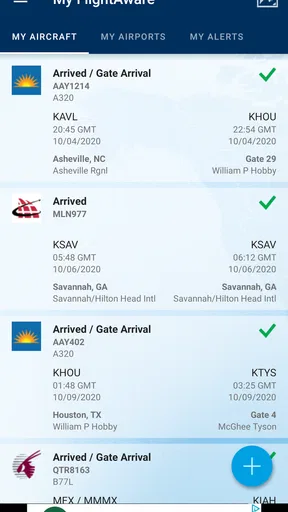
The first thing I noticed about FlightAware Flight Tracker was how straightforward the interface is. You don't need to be an aviation expert to navigate through it. From the main screen, you can search for flights using the flight number, airport code, or even the route. Once you input your query, the app pulls up detailed information about the flight, including departure and arrival times, current status, and even the type of aircraft. It's like having a personal air traffic control in your pocket!
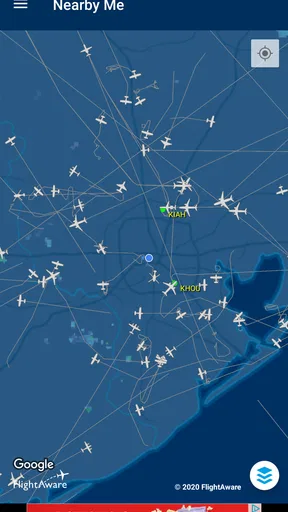
One of my favorite features is the ability to track flights in real-time on a map. You can literally watch a plane's journey across the globe, which is both fascinating and reassuring if you're waiting for a loved one to land. The map updates frequently, ensuring you're always in the loop.
Following a journey without overchecking
A useful way to make the map work for me is to use it for context, then return to the status view when I need a decision. The route gives a satisfying sense of where the aircraft is, but watching its position minute by minute is not always the same as learning whether my own plans need to change. I find it more useful to check at a few decision points: before leaving home, while waiting for a pickup, or before telling someone else to set off.
That is especially helpful when several people are coordinating. The person at home can follow the flight, the driver can wait for a meaningful update, and the passenger can focus on travelling. If plans change, the tracker can help everyone discuss the same flight rather than rely on a vague “it looks late” message. I would still confirm any important instruction directly with the airline, because a tracking view is not a replacement for official boarding and gate information.
Additional Features Worth Noting
FlightAware Flight Tracker isn't just about tracking flights. The app also offers a wealth of information about airports and airlines. You can view airport data such as delays, weather conditions, and terminal maps. This is particularly useful if you're navigating an unfamiliar airport and want to know what to expect.
The app also provides alerts for flight status changes, which is a lifesaver when you're juggling multiple plans and need to know exactly when to leave for the airport. You can set up notifications for departure and arrival delays, cancellations, and gate changes. Trust me, this feature alone can save you from a lot of airport stress.
Using alerts as a handoff
Alerts are most valuable to me when I decide in advance who needs to act on them. A traveller might want to know about a departure change, while someone driving to collect them is mainly concerned with arrival timing. Setting up the relevant notifications can reduce repeated checking, but I would avoid assuming that every alert means I should immediately change plans. I use a notification as a prompt to look again, then make the practical decision based on the full status and any instructions from the airline.
For a realistic example, imagine I am collecting a friend after work. I can check the flight before leaving, then keep an eye out for a meaningful change while I am on the way. If the timing shifts, I can tell my friend I am adjusting the pickup rather than leaving them to guess where I am. The app helps with that shared picture; it does not remove the need to agree on a meeting point or keep a backup plan if the airport is busy.
Design and Usability
Now, let's talk about the design. The app's interface is clean and intuitive, with a modern look that doesn't overwhelm you with too much information at once. It's simple enough for anyone to use, yet comprehensive enough to keep aviation enthusiasts like me entertained for hours. The developers have done a fantastic job of balancing functionality with user-friendliness.
There are no annoying ads cluttering the screen, which is a huge plus in my book. You can also customize the app's settings to suit your preferences, such as choosing between different map views and setting your preferred units of measurement. It's these little touches that make using the app a pleasant experience.
When a simpler option is better
For a single upcoming trip, the airline’s own app may be the more direct choice if all I need is my booking, check-in steps, or an official gate instruction. An airport display is also a sensible last check once I am inside the terminal. I reach for this tracker when the flight itself is the question—where it is, how its status is changing, or whether a pickup plan should be adjusted—not when I need to manage every part of a booking.
Compared with a basic flight-status search, the map and airport-focused information make this feel more suited to following movement and putting a delay in context. The trade-off is that a map can invite more checking than the situation deserves, and no tracking app can make a changing airport plan effortless. I would skip it if I only want to store tickets and manage a reservation, or if I find live map updates more distracting than reassuring.
Who Is It For?
Whether you're a frequent flyer, a travel enthusiast, or just someone who likes to keep tabs on flights, FlightAware Flight Tracker has something to offer. It's particularly beneficial for those who travel frequently and need reliable information on flight statuses and airport conditions.
Families and friends of travelers will also find this app invaluable. There's a certain peace of mind that comes from knowing exactly where a flight is and when it will arrive. And let's not forget the aviation geeks who can spend hours tracking flights just for fun. This app is like a playground for them!
Who may find it less useful
I would recommend it most to people who regularly meet arriving travellers, coordinate a pickup, or enjoy understanding what is happening beyond a flight’s scheduled time. It can also be handy for someone with a connection to monitor a flight they are meeting, provided they keep the airline’s own directions in view. The benefit is less obvious for a traveller who only checks status once and already relies on an airline app for the rest of the trip.
It is also worth remembering that following a plane on a map is not a promise that every later step will run to plan. A flight can be moving while the passenger still has to navigate a terminal, collect luggage, or reach a pickup point. I use the tracker to improve my estimate and coordinate with others, not to assume that the instant an aircraft arrives is the instant someone will be outside.
Details, cost, and everyday expectations
The app has been available since September 2011, and its current version is 5.15.2, with support for devices running Android 8.0 or later. It is free to install, though it includes optional in-app purchases priced from $0.99 to $5.99 per item. I would start with the free experience and decide whether any paid option is useful for my own habits rather than treating an extra purchase as necessary to check a flight.
Its audience is broad: the Everyone age rating makes it suitable for general use, and its 10 million-plus installs show that flight tracking is a familiar need for many people. Its average rating is 3.7 from around 45,000 ratings, alongside about 3,700 written reviews. I take that as a reason to judge it by my own workflow: if I want a quick status check and a visual view of a journey, the core idea is appealing; if I expect it to replace airline communication or a complete trip planner, I may find the fit less satisfying.
Final Thoughts
All in all, FlightAware Flight Tracker is a must-have app for anyone interested in aviation or needing up-to-date flight information. Its ease of use, robust features, and real-time tracking capabilities make it a standout choice in the crowded world of flight tracking apps.
So, the next time you're planning a trip or just curious about the planes flying overhead, give this app a try. You might find yourself checking flights just for the thrill of it, like I do. Safe travels!
Privacy and Permissions
See what permissions an app requests and how it handles your data.
- Location
- approximate location (network-based), precise location (GPS and network-based)
- Wi-Fi connection information
- view Wi-Fi connections
- Other
- view network connections, full network access, prevent device from sleeping, read Google service configuration
Verdict
Strengths of FlightAware Flight Tracker
- Real-time flight tracking accuracy.
- User-friendly and intuitive interface.
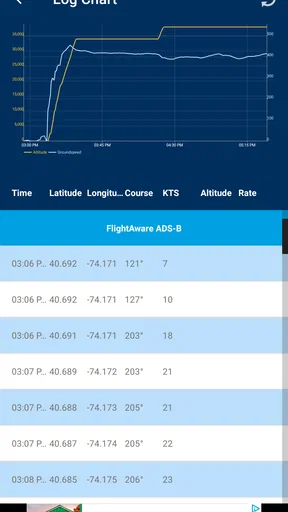
- Detailed flight history and data.
- Customizable alerts for updates.
- Global coverage with extensive data.
Limitations of FlightAware Flight Tracker
- Frequent ads in the free version.
- Limited features without a subscription.
- Occasional data loading delays.
- Requires stable internet connection.
- Battery drain on prolonged use.
Similar Picks in This Category
View All
Google Maps
Google LLC3.4

Google Maps Go
Google LLC4.1

Booking.com: Hotels & Travel
Booking.com Hotels & Vacation Rentals4.8

Google Earth
Google LLC3.8

Skyscanner Flights Hotels Cars
Skyscanner Ltd4.8

trivago: Compare hotel prices
trivago N.V.4.4
Frequently Asked Questions
What features does FlightAware Flight Tracker offer?
FlightAware Flight Tracker provides real-time flight tracking with comprehensive data on commercial and general aviation flights. Users can view flight paths, arrival and departure times, gate information, and delays. The app also includes advanced maps and alerts for flight status changes, making it ideal for aviation enthusiasts and frequent travelers.
Is FlightAware Flight Tracker free to use?
Yes, FlightAware Flight Tracker is free to download and use. However, there are optional in-app purchases and subscription services that offer enhanced features, such as ad-free usage and more detailed data. These premium services are designed for users who need more in-depth tracking capabilities.
How accurate is the flight data on FlightAware Flight Tracker?
FlightAware Flight Tracker utilizes data from multiple sources, including radar and satellite feeds, to provide accurate and up-to-date flight information. While the app strives for precision, factors such as temporary disruptions in data feeds or changes made by airlines can occasionally affect accuracy. Generally, users find the data reliable and timely.
Can I track international flights with FlightAware Flight Tracker?
Yes, FlightAware Flight Tracker allows users to track flights globally. The app covers a wide range of international airports and airspaces, providing comprehensive tracking for both domestic and international flights. Users can search flights by airline, flight number, or route to access detailed tracking information.
What devices are compatible with FlightAware Flight Tracker?
FlightAware Flight Tracker is available for both Android and iOS devices. Compatibility includes a wide range of smartphones and tablets. Users can download the app from the Google Play Store for Android or the Apple App Store for iOS, ensuring a seamless experience across different platforms.
